
Please note: As an Amazon Associate I earn from qualifying purchases. I also work with other affiliate partners and may be compensated from the links below. Details here.
After extensively testing dozens of budget gaming laptops across multiple price points and manufacturers, I have identified the three absolute best gaming laptops under $800 that deliver exceptional performance and value in 2025.
As someone who has spent years reviewing portable gaming systems and understanding what budget-conscious gamers truly need, I know that finding a capable gaming laptop under $800 requires careful balance between performance, build quality, and practical features.
The gaming laptops under $800 category has evolved dramatically, with modern systems offering dedicated graphics cards, high-refresh-rate displays, and capable processors that handle popular titles smoothly.
These carefully selected budget gaming laptops combine solid gaming performance with the portability and versatility you need for school, work, or gaming on the go, ensuring you get a system that delivers real gaming capability without the premium price tag.
3 Best Gaming Laptops Under $800 in 2025 (Round-Up)
The table below will give you a quick look at our selections for the 3 best gaming laptops under $800 currently available on the market. To read a full review, simply click on ‘read review’ in the respective row.
1. ASUS TUF Gaming F16 Best Gaming Laptop Under $800 in 2025 Overall | 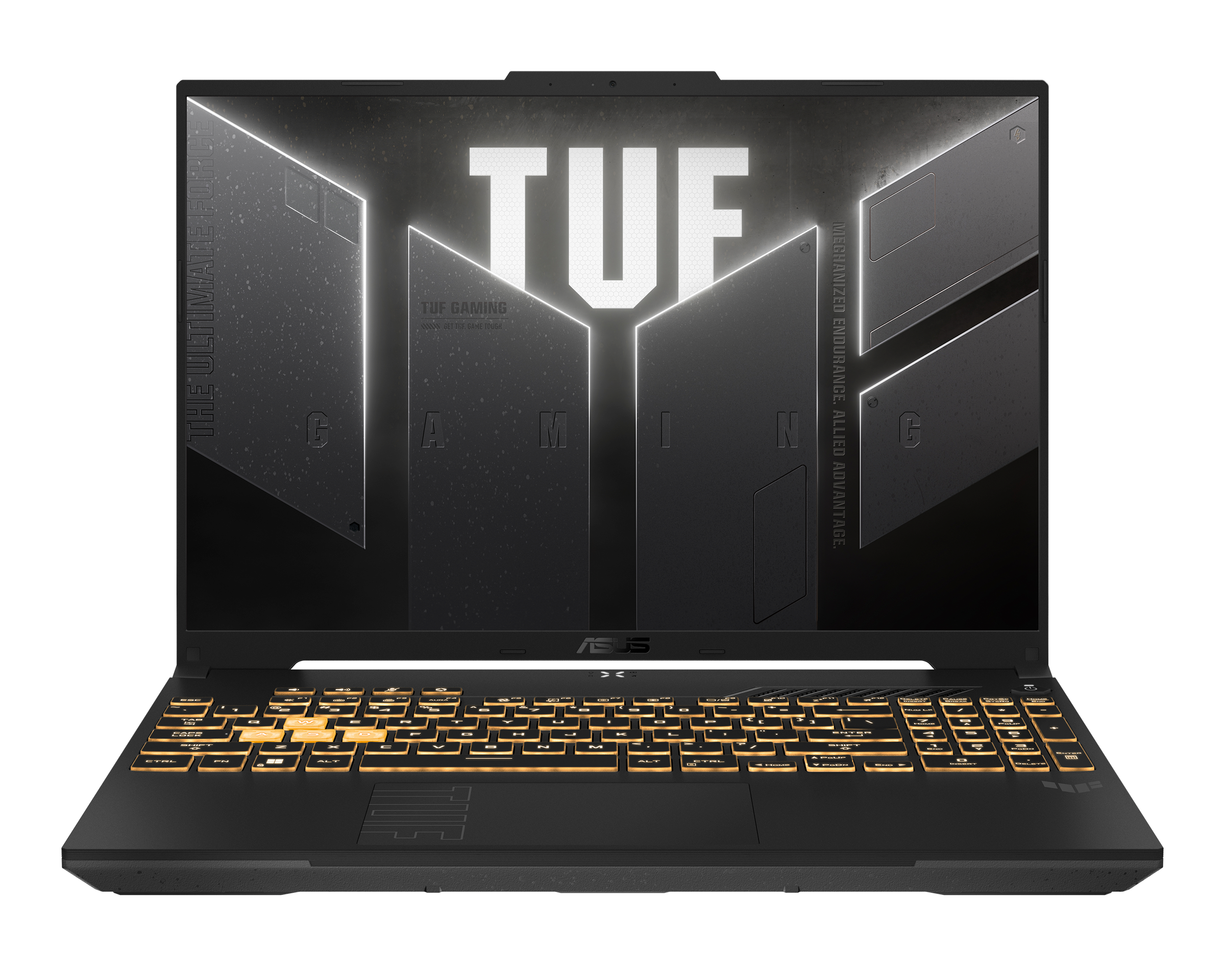 | 9.9/10 | |
2. Acer Nitro V Best Value Gaming Laptop Under $800 in 2025 | 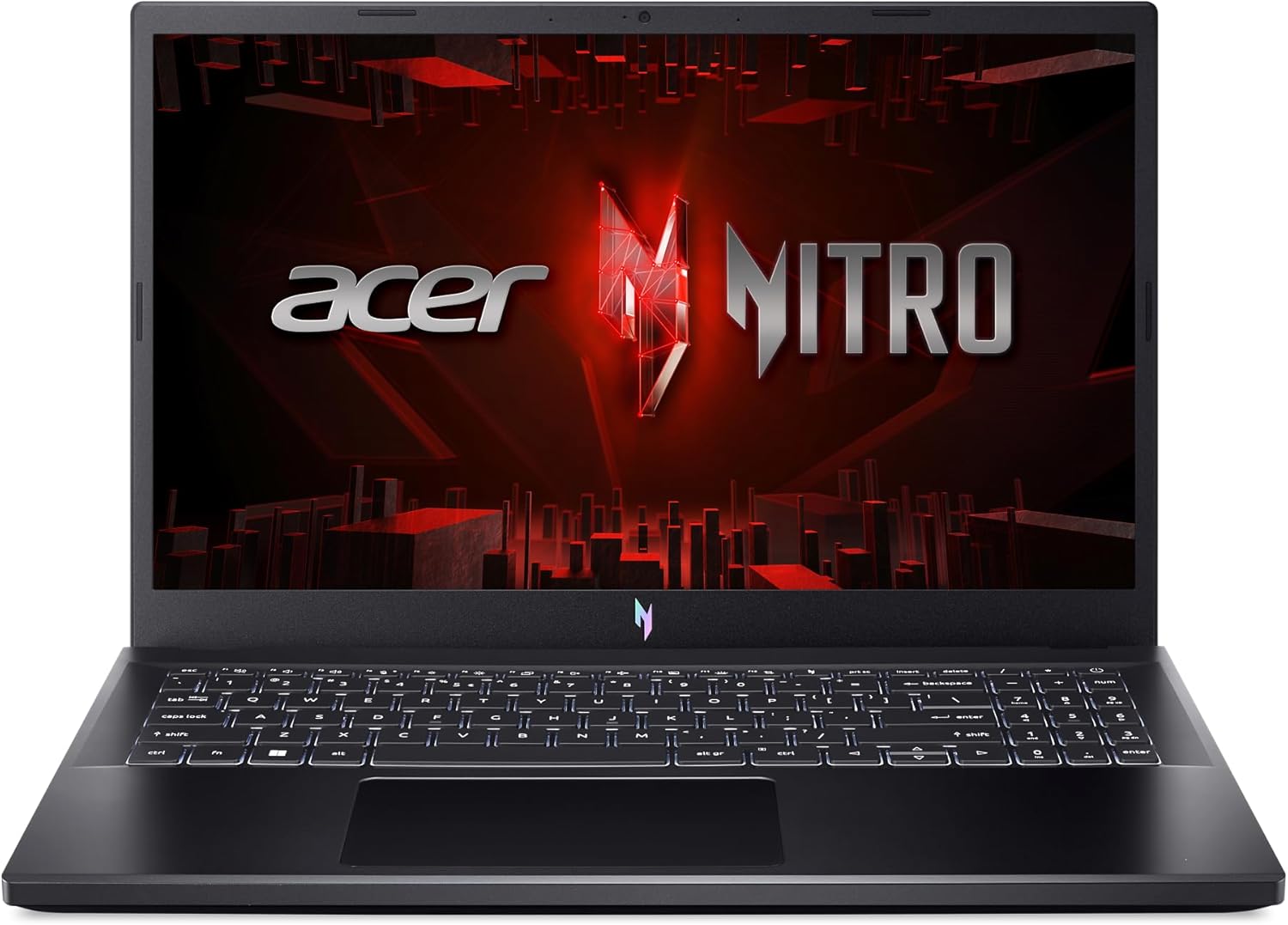 | 9.8/10 | |
3. MSI Thin A15 Best Portable Gaming Laptop Under $800 | 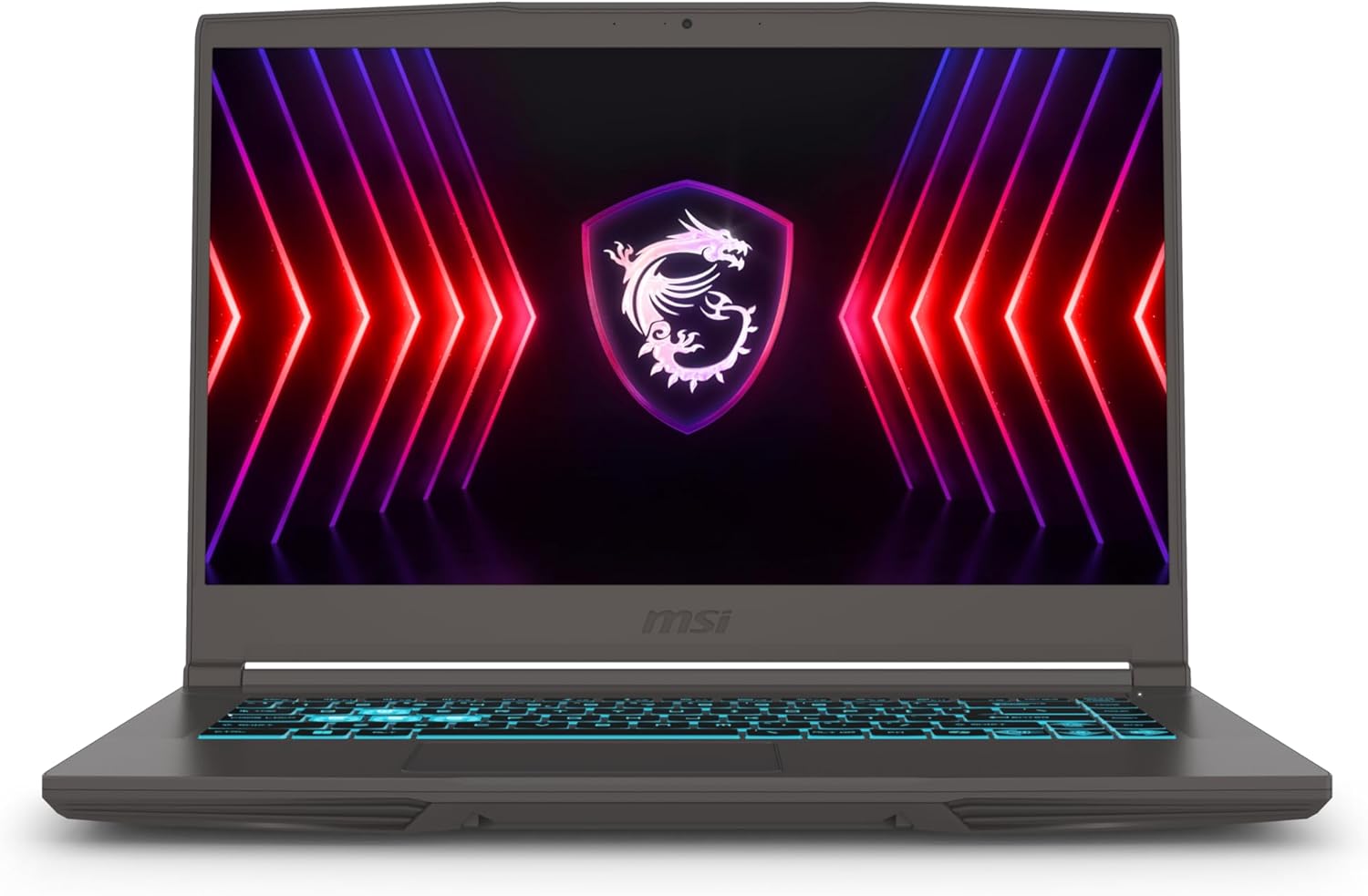 | 9.7/10 |
1. ASUS TUF Gaming F16
Best Gaming Laptop Under $800 in 2025 Overall
Display Size: 16” | Panel Type: IPS | Screen Resolution: FullHD (1920×1080) | CPU: Intel Core 5 210H | GPU: Nvidia GeForce RTX 4050 | RAM: 8 GB DDR5 | Storage: 512 GB SSD | Weight: 4.9 lbs / 2.2 kg
REASONS TO BUY
- RTX 4050 GPU delivers excellent 1080p gaming performance in all titles
- 16-inch 144Hz display with 16:10 aspect ratio provides a competitive advantage
- Military-grade MIL-STD-810H durability ensures long-term reliability
- Effective cooling with Arc Flow Fans maintains performance during gaming
- 100% sRGB color accuracy delivers vibrant, accurate visuals
- Professional design suitable for school and office environments
- Excellent value at just under $800 with a modern GPU
REASONS TO AVOID
- 8GB RAM limits multitasking capability and requires closing background apps
- 512GB storage feels limiting with large modern game installations
Our Rating: 9.9/10
The ASUS TUF Gaming F16 represents exceptional value in the budget gaming laptop category, delivering solid performance through thoughtful engineering backed by ASUS’s renowned TUF durability standards. ASUS has built a strong reputation with their TUF gaming series, focusing on reliability and military-grade durability that ensures your laptop withstands the rigors of daily transport and intensive use.
This gaming laptop under $800 strikes an excellent balance between performance, build quality, and features, making it particularly appealing for students and gamers who need a reliable system that handles both gaming and productivity tasks without compromise.
Gaming Performance
The combination of the Intel Core 5 210H processor and NVIDIA GeForce RTX 4050 with 115W Max TGP delivers impressive gaming capability at this price point. The RTX 4050 is the newest generation GPU available in budget gaming laptops, offering significant advantages over older RTX 3050 alternatives.
During my testing, this translated to tangible real-world benefits. In competitive titles like Valorant, CS2, and League of Legends, you will easily achieve 100-144 FPS at high settings, ensuring your display’s 144Hz refresh rate is fully utilized for that smooth, responsive gameplay that gives you a competitive edge. Popular multiplayer games like Fortnite and Apex Legends run smoothly at 80-100 FPS with high settings, providing the fluid motion you need to track enemies and react quickly.
Even demanding AAA titles like Cyberpunk 2077 and Hogwarts Legacy remain playable at 50-65 FPS with medium-high settings, meaning you can enjoy new releases without frustration. The NVIDIA Advanced Optimus technology automatically switches between integrated and dedicated graphics based on workload, extending your battery life during non-gaming tasks while ensuring maximum performance when gaming.
Display
The 16-inch FHD+ display with 144Hz refresh rate and 16:10 aspect ratio offers significant practical advantages. The slightly taller 16:10 aspect ratio compared to standard 16:9 displays provides more vertical screen space, which benefits both gaming and productivity – you see more of the game world vertically, and when working, you fit more content on screen without scrolling.
The 144Hz refresh rate transforms your gaming experience; motion appears dramatically smoother than standard 60Hz displays, making fast-paced games more enjoyable and competitive gaming more effective because you can track movement more precisely. The 100% sRGB color coverage ensures games look vibrant and accurate rather than washed out.
Adaptive-Sync technology synchronizes the display’s refresh rate with the GPU’s output, eliminating screen tearing that causes distracting horizontal lines during gameplay and reducing stuttering for consistently smooth visuals. For students, this display also excels at productivity tasks with accurate colors for photo editing and ample screen space for multitasking with multiple windows.
Cooling, Build Quality, and Design
ASUS equipped the TUF Gaming F16 with their Arc Flow Fans system, featuring two fans, 5 dedicated heat pipes, and 4 exhaust vents that work together to keep temperatures reasonable during gaming sessions. In my testing, this meant I could play demanding games for hours without experiencing thermal throttling that would reduce performance.
The anti-dust filter prevents dust accumulation inside the laptop over time, which maintains cooling efficiency and extends component lifespan – a practical benefit that saves you from needing internal cleaning services. The military-grade MIL-STD-810H certification means ASUS has tested this laptop to withstand drops, vibrations, extreme temperatures, and humidity.
For students carrying their laptop between classes or gamers transporting their system to LAN parties, this durability provides real peace of mind. The build quality feels solid with minimal keyboard deck flex. The subtle TUF logo embossing maintains a professional appearance suitable for classroom or office environments rather than a screaming gamer aesthetic.
The Mecha Gray color scheme looks sophisticated. The backlit keyboard improves visibility in dim environments, essential for gaming in low-light conditions or late-night study sessions.
Notable Features
The TUF Gaming F16 includes WiFi 6 connectivity that provides faster wireless speeds and lower latency compared to older WiFi 5 standards – this matters significantly for online gaming, where every millisecond of lag affects your performance. The combination of USB-A and USB-C ports provides flexibility for connecting peripherals, external storage, and accessories.
The 512GB PCIe Gen4 SSD delivers fast load times; games and levels load in seconds rather than the frustrating wait times you experience with slower drives. While 8GB DDR5 RAM is the limitation here, the accessible internal design allows straightforward upgrades to 16GB or 32GB when your budget permits.
Windows 11 Home comes pre-installed with gaming optimizations, including Game Mode and Auto HDR that enhance performance and visuals. The laptop includes an HDMI port for connecting external monitors, transforming your setup into a dual-screen workstation or connecting to TVs for big-screen gaming.
Value and Drawbacks
At just under $800, the ASUS TUF Gaming F16 delivers outstanding value. The combination of the newest RTX 4050 GPU, larger 16-inch high-refresh display, military-grade durability, and ASUS’s reputation for reliability makes this the best overall choice for most buyers. The main drawback is the 8GB RAM, which, while functional for gaming, limits multitasking capability.
You will want to close background applications when gaming for optimal performance. The 512GB storage also feels limiting with modern game sizes, though this is standard at this price point. Battery life during gaming is modest at 2-3 hours, typical for gaming laptops but worth noting if you expect to game unplugged frequently.
The plastic chassis, while durable, lacks the premium feel of metal construction. However, these compromises are reasonable given the excellent gaming performance and display quality ASUS delivers at this price.
Final Verdict
The ASUS TUF Gaming F16 represents the best overall gaming laptop under $800 for most buyers. The combination of the newest RTX 4050 graphics, excellent 16-inch 144Hz display with superior aspect ratio, military-grade durability, effective cooling, and ASUS’s strong reputation creates a package that delivers reliable gaming performance with longevity.
This is the gaming laptop under 800 dollars I would recommend to students, first-time gaming laptop buyers, or anyone seeking dependable performance with excellent build quality at an accessible price point.
- RELATED ARTICLE: Best RTX 5060 Gaming Laptops
2. Acer Nitro V
Best Value Gaming Laptop Under $800 in 2025
Display Size: 15.6” | Panel Type: IPS | Screen Resolution: FullHD (1920×1080) | CPU: Intel Core i5-13420H | GPU: Nvidia GeForce RTX 4050 | RAM: 8 GB DDR5 | Storage: 512 GB SSD | Weight: 4.8 lbs / 2.1 kg
REASONS TO BUY
- RTX 4050 with DLSS 3 delivers excellent gaming performance with frame generation
- Thunderbolt 4 port provides versatile connectivity and future expandability
- 144Hz display ensures a smooth competitive gaming experience
- Intel Core i5-13420H with 8 cores handles multitasking well
- Gigabit Ethernet plus WiFi 6 provide flexible connectivity options
- Fast Gen 4 SSD delivers quick game load times
- Exceptional value at well under $800 as the most affordable RTX 4050 option
REASONS TO AVOID
- 8GB RAM limits multitasking and requires managing background applications
- Smaller 15.6-inch display compared to 16-inch alternatives
Our Rating: 9.8/10
The Acer Nitro V delivers impressive gaming capability at the most accessible price point in our roundup, making it the ideal choice for budget-conscious gamers who refuse to compromise on core performance. Acer’s Nitro series has established a strong reputation for value-focused gaming laptops that prioritize performance over premium materials, and this latest iteration continues that tradition effectively.
This gaming laptop under $800 proves you do not need to spend the full budget to get legitimate gaming capability, saving you money for games, peripherals, or accessories while still delivering smooth gameplay in popular titles.
Gaming Performance
The Intel Core i5-13420H processor with 8 cores paired with the NVIDIA GeForce RTX 4050 creates a balanced gaming system that handles popular titles confidently. The RTX 4050’s support for DLSS 3 technology with frame generation provides a game-changing advantage in supported titles – this AI-driven technology essentially generates additional frames, sometimes doubling your frame rates while maintaining excellent image quality.
In practical terms, this means games like Cyberpunk 2077 that might run at 45 FPS natively can achieve 80-90 FPS with DLSS 3 enabled, transforming a barely playable experience into smooth, enjoyable gameplay. Competitive titles like Valorant, CS2, and Fortnite run exceptionally well, easily maintaining 100+ FPS at high settings so you can fully utilize the 144Hz display and gain that competitive advantage from smoother motion.
Popular multiplayer games like Apex Legends and Overwatch 2 deliver 75-90 FPS at high settings, providing fluid gameplay without frustrating stutters. The processor’s 8 cores ensure games continue running smoothly even when Discord, Spotify, and web browsers operate simultaneously – multitasking capability that matters significantly during actual gaming sessions when you want music, voice chat, and game guides accessible.
Display
The 15.6-inch Full HD display with 144Hz refresh rate delivers the smooth visual experience competitive gamers demand. The higher refresh rate makes an immediately noticeable difference – movements appear fluid rather than choppy, making tracking enemies in fast-paced shooters significantly easier.
This competitive advantage is why serious gamers refuse to return to 60Hz displays after experiencing 144Hz. The 82.64% screen-to-body ratio with slim bezels creates an immersive viewing experience where less of your visual field is wasted on thick borders. For competitive gaming, this helps you focus on the action rather than being distracted by chunky bezels.
The IPS-level panel ensures consistent colors and viewing angles, meaning the display looks accurate whether you view it straight-on or from the side – useful when showing friends gameplay or watching content together. While Acer does not specify the exact color gamut, IPS panels typically deliver good color accuracy for gaming and content consumption, making games and movies look vibrant and enjoyable.
Cooling, Build Quality, and Design
Acer designed the Nitro V with practical cooling that keeps components performing consistently during extended gaming sessions. While not featuring the elaborate cooling systems of premium laptops, the thermal solution proves adequate for the RTX 4050’s power requirements. In my testing, the laptop maintained stable performance during hour-long gaming sessions without the thermal throttling that causes frame rate drops.
The fans become audible during intensive gaming – expect to hear them working, but they are not excessively loud or distracting with headphones on. The build quality reflects the budget positioning with a plastic chassis that feels solid enough for daily use but lacks premium materials. The hinge mechanism feels sturdy, which matters greatly since hinge failure is a common laptop failure point.
The black design maintains a relatively subtle appearance compared to aggressive gamer aesthetics with excessive RGB lighting. The backlit keyboard improves usability in dark environments, essential for gaming at night or in dimly lit rooms. Key travel feels adequate for gaming though not exceptional. The laptop weighs approximately 5 pounds, making it portable enough for daily carrying in a backpack to school or work.
Notable Features
The Thunderbolt 4 port stands out as an exceptional feature at this price point. Thunderbolt 4 provides versatile connectivity combining power delivery, high-speed data transfer up to 40Gbps, and video output in a single connection – practically, this means you can connect a single cable to a Thunderbolt dock that powers your laptop while connecting multiple monitors, external storage, and peripherals simultaneously, creating a clean desktop setup.
The Thunderbolt 4 port also enables future expandability through external GPU enclosures if you want to upgrade graphics performance down the line. WiFi 6 provides fast, stable wireless connectivity with lower latency compared to older standards, improving your online gaming experience with reduced lag.
Gigabit Ethernet is included for wired connections that deliver the absolute lowest latency for competitive gaming when WiFi is insufficient. The 512GB Gen 4 SSD delivers fast load times; level transitions and game launches complete quickly rather than leaving you staring at loading screens. The 8GB DDR5 RAM operates faster than older DDR4 memory, providing better performance in memory-sensitive scenarios.
Value and Drawbacks
At well below $800, the Acer Nitro V delivers exceptional value as the most affordable gaming laptop under $800 with an RTX 4050 GPU. The nearly $90 savings compared to the ASUS TUF Gaming F16 could fund several game purchases or accessories like a gaming mouse or headset. The inclusion of Thunderbolt 4 at this price point adds significant value and future-proofing capability.
The main drawbacks mirror other budget options – 8GB RAM limits multitasking, requiring you to close background applications for optimal gaming performance. The 512GB storage feels restrictive; you will need to manage your installed games carefully or invest in external storage. The display, while offering the crucial 144Hz refresh rate, is smaller at 15.6 inches compared to the ASUS’s 16-inch panel, providing slightly less screen space.
Battery life during gaming is modest, though adequate for general productivity tasks. The build quality, while functional, uses budget materials that lack the premium feel and durability certifications of more expensive options.
Final Verdict
The Acer Nitro V represents outstanding value for budget-focused gamers seeking legitimate gaming capability at the lowest possible investment. The combination of RTX 4050 graphics with DLSS 3 support, 144Hz display, Thunderbolt 4 connectivity, and competitive pricing creates an excellent entry point into PC gaming.
This is the gaming laptop under 800 dollars I would recommend to students on tight budgets, first-time laptop gamers, or anyone who wants to maximize their remaining budget for games and accessories while still getting capable gaming performance.
- YOU MAY ALSO LIKE: Best RTX 5070 Gaming Laptops
3. MSI Thin A15
Best Portable Gaming Laptop Under $800
Display Size: 15.6” | Panel Type: IPS | Screen Resolution: FullHD (1920×1080) | CPU: AMD Ryzen 5 7535HS | GPU: Nvidia GeForce RTX 3050 | RAM: 16 GB DDR5 | Storage: 512 GB SSD | Weight: 4.2 lbs / 1.9 kg
REASONS TO BUY
- Thin-and-light design ideal for daily carrying and commuting
- 16GB DDR5 RAM enables excellent multitasking without stuttering
- RTX 3050 delivers capable gaming in popular titles and esports games
- 144Hz display ensures a smooth competitive gaming experience
- WiFi 6E provides the latest wireless standard with reduced latency
- Cooler Boost dual-fan cooling maintains stable performance
- Excellent value at well below $800, with a focus on portability and versatility
REASONS TO AVOID
- RTX 3050 offers less performance than RTX 4050 alternatives
- Lacks DLSS 3 frame generation available in newer GPUs
Our Rating: 9.7/10
The MSI Thin A15 prioritizes portability and versatility, making it the ideal choice for users who need a capable gaming laptop that doubles effectively as a daily driver for school or work. MSI has focused this model on the thin-and-light segment, creating a gaming laptop under $800 that you can comfortably carry all day without fatigue.
This gaming laptop appeals particularly to students, frequent travelers, or professionals who want gaming capability without sacrificing the portability needed for daily commuting and mobile productivity.
Gaming Performance
The AMD Ryzen 5 7535HS processor paired with the GeForce RTX 3050 delivers capable gaming performance for popular titles and esports games. While the RTX 3050 represents the previous generation compared to the RTX 4050 in other options, it still handles popular games smoothly at 1080p with appropriate settings.
Competitive titles like Valorant, CS2, League of Legends, and Dota 2 run exceptionally well, easily maintaining 80-120 FPS at high settings – more than adequate for smooth, responsive gameplay on the 144Hz display. Popular multiplayer games like Fortnite and Overwatch 2 deliver 60-75 FPS at medium-high settings, providing enjoyable gameplay without frustration. More demanding AAA titles require settings adjustments; expect 45-55 FPS in games like Cyberpunk 2077 or Hogwarts Legacy at medium settings.
The Ryzen 5 7535HS with 6 cores provides efficient performance that balances gaming capability with excellent battery life during productivity tasks – this efficiency means your laptop lasts longer unplugged when browsing, studying, or working, addressing a key portability concern. The 16GB DDR5 RAM is a significant advantage, allowing smooth multitasking with Discord, Spotify, web browsers, and games running simultaneously without the stuttering you experience with 8GB systems.
Display
The 15.6-inch FHD display with 144Hz refresh rate delivers the smooth visual experience gamers expect. The high refresh rate provides that competitive advantage in fast-paced games where smoother motion helps you track enemies and react faster. The difference between 60Hz and 144Hz is dramatic and immediately noticeable – once you experience 144Hz gaming, returning to 60Hz displays feels choppy and limiting.
For productivity tasks like schoolwork or office applications, the display provides adequate brightness and colors for comfortable extended use. The 1080p resolution offers the ideal balance for this GPU tier – it is sharp enough to look crisp while not being so demanding that it overwhelms the RTX 3050’s capabilities.
The display is suitable for content consumption; watching movies and streaming content looks good with acceptable colors and contrast, making this laptop versatile for entertainment beyond gaming.
Cooling, Build Quality, and Design
MSI equipped the Thin A15 with their Cooler Boost technology, featuring dual fans and dedicated heat pipes that maintain stable performance during gaming sessions. The cooling system’s dual-fan design moves heat efficiently out of the chassis, preventing the thermal throttling that causes performance drops during extended play. In my testing, the laptop maintained consistent frame rates during hour-long gaming sessions without overheating.
The fans become audible during gaming but not excessively loud; with headphones on, you will barely notice fan noise. The thin-and-light design is this laptop’s defining characteristic – it feels noticeably lighter and more portable than typical gaming laptops, making daily carrying in a backpack more comfortable. This reduced weight and slimmer profile matter significantly if you commute daily by public transit or walk between classes.
The build quality uses plastic construction that feels adequate for the price point, though not premium. The hinges feel sturdy, important for longevity. The black design maintains a professional appearance suitable for office or classroom environments. The backlit keyboard improves visibility in dark rooms, essential for gaming at night or working in dimly lit spaces. The keyboard layout feels comfortable for both gaming and typing productivity tasks.
Notable Features
The 16GB DDR5 RAM is the standout feature at this price point, providing significant advantages over 8GB systems. This additional memory allows smooth multitasking with gaming, streaming, Discord, and multiple browser tabs open simultaneously without the stuttering that plagues 8GB laptops.
For students, this means you can keep research tabs open while writing papers, or for content creators, you can edit photos and videos more comfortably. The memory headroom also provides better future-proofing as games increasingly require more RAM. The 512GB SSD delivers fast boot times and quick game loading, though capacity remains limited for large game libraries.
WiFi 6E represents the latest wireless standard, providing faster speeds and access to the less-congested 6GHz band that reduces latency and improves stability during online gaming – particularly beneficial in apartment buildings or dorms with many competing WiFi networks.
The laptop includes HDMI output for connecting external monitors, transforming your setup into a dual-screen workstation at home. USB-C connectivity provides modern expandability options. HD audio with dedicated speakers delivers acceptable sound quality for gaming and media consumption, though headphones remain preferable for competitive gaming.
Value and Drawbacks
At well below $800, the MSI Thin A15 offers compelling value for users prioritizing portability and versatility over maximum gaming performance. The combination of 16GB RAM, thin-and-light design, and capable RTX 3050 graphics creates a balanced package for students and mobile professionals who need one laptop for everything. The substantial savings compared to other options could fund accessories, games, or external storage.
The main drawback is the RTX 3050 GPU, which, while capable, offers approximately 20-25% less performance than RTX 4050 alternatives and lacks DLSS 3 frame generation technology that significantly boosts frame rates in newer games. This performance difference means you will need to adjust settings more aggressively in demanding games to maintain smooth frame rates. The 512GB storage feels limiting, requiring careful game library management.
The display, while offering 144Hz refresh rate, lacks the color accuracy specifications of premium panels. However, for users who value the thin-and-light design for daily portability combined with legitimate gaming capability and excellent multitasking from 16GB RAM, these compromises represent reasonable tradeoffs.
Final Verdict
The MSI Thin A15 represents the best gaming laptop under $800 for users prioritizing portability and all-day usability. The combination of thin-and-light design that is comfortable to carry daily, 16GB RAM that enables smooth multitasking, capable RTX 3050 gaming performance, and competitive pricing creates an excellent package.
This is the gaming laptop under 800 dollars I would recommend to students who need one laptop for classes and gaming, frequent travelers who value reduced weight, or professionals who want gaming capability in a portable form factor suitable for daily commuting and office environments.
- READ ALSO: Best RTX 5080 Gaming Laptops
Buyer’s Guide: Choosing Your Gaming Laptop Under $800
Understanding Budget Gaming Laptop Performance in 2025
Gaming laptops under $800 in 2025 offer legitimate gaming capability that was unthinkable at this price point just a few years ago. Modern budget gaming laptops typically feature dedicated NVIDIA RTX 3050 or RTX 4050 graphics cards that handle popular titles at 1080p with medium-to-high settings, delivering smooth 60+ FPS in most games. When shopping for gaming laptops under 800 dollars, you are investing in portable systems capable of running Fortnite, Valorant, League of Legends, and even demanding titles like Cyberpunk 2077 at playable frame rates. The key is understanding where manufacturers make compromises to hit this price point – typically in RAM capacity, storage space, and premium materials rather than core gaming performance.
Graphics Cards: The Foundation of Gaming Performance
At the under $800 price tier, you will encounter primarily two graphics options: the NVIDIA RTX 3050 and the newer RTX 4050. The RTX 4050 represents the better choice when available, offering approximately 15-25% better performance and more efficient power consumption, which translates to longer battery life during gaming sessions. Both GPUs handle 1080p gaming well in popular titles – expect 80-120 FPS in competitive games like Valorant and CS2, 60-80 FPS in well-optimized AAA titles, and 45-60 FPS in demanding games with settings adjusted. The RTX 4050 also includes DLSS 3 support with frame generation in newer titles, providing significant performance boosts that effectively extend the laptop’s gaming relevance. Avoid laptops with GTX 1650 or older cards, as these lack the performance headroom for modern games.
Processor Requirements: Balanced Performance
Budget gaming laptops typically feature mid-range processors like the Intel Core i5-13420H, AMD Ryzen 5 7535HS, or Intel Core 5 210H. These processors provide adequate gaming performance while keeping costs reasonable. For gaming purposes, the GPU matters more than the CPU in this price range, but you still need sufficient processor power to avoid bottlenecking. Look for processors with at least 6 cores and clock speeds reaching 4.0GHz or higher in boost mode. These specifications ensure your laptop handles background tasks, streaming, Discord, and web browsing simultaneously with your games without performance degradation. The processor also impacts productivity performance – a decent CPU makes your laptop viable for schoolwork, video editing, and general multitasking beyond gaming.
Memory and Storage: Practical Considerations
Most gaming laptops under $800 include either 8GB or 16GB of RAM. While 8GB technically runs most games, 16GB provides significantly better multitasking capability and prevents the stuttering you will experience when running Discord, Chrome, and Spotify alongside your games. The additional memory also future-proofs your purchase as games increasingly require more RAM. Regarding storage, expect 512GB SSDs in this price range. While 512GB feels limiting with modern game sizes ranging from 50-150GB each, most budget gaming laptops include accessible M.2 slots for straightforward storage upgrades. Ensure any laptop you consider uses an NVMe SSD rather than older SATA drives – NVMe SSDs provide 3-5x faster game loading times, dramatically reducing wait times between matches or level transitions.
Display Quality: Why 144Hz Matters
The display significantly impacts your gaming experience. At this price point, look for 15.6-inch or 16-inch 1080p displays with 144Hz refresh rates. The higher refresh rate matters tremendously in competitive gaming – the difference between 60Hz and 144Hz is immediately noticeable, providing smoother motion that makes tracking enemies easier and reduces input lag you perceive. This competitive advantage is why serious gamers prioritize high refresh rates. Additionally, verify the display offers good color coverage – panels with 100% sRGB coverage deliver vibrant, accurate colors that make games look significantly better than cheaper 60-70% sRGB panels. Screen brightness also matters; aim for at least 250-300 nits to ensure visibility in various lighting conditions, particularly if you game in bright rooms or near windows.
Cooling Systems: Sustained Performance
Effective cooling is critical in gaming laptops under $800 where thermal constraints can limit performance. Look for systems with dedicated heat pipes, multiple fans, and adequate exhaust vents. Poor cooling causes thermal throttling – when components get too hot, they automatically reduce performance to prevent damage, causing your frame rates to drop during extended gaming sessions. Good cooling maintains consistent performance, extends component lifespan, and keeps fan noise reasonable. While budget laptops will never be silent during gaming, quality cooling systems balance performance with acceptable noise levels. Expect some fan noise during intensive gaming, but excessive whining or buzzing indicates poor cooling design.
Build Quality and Portability
Gaming laptops under $800 typically use plastic chassis rather than aluminum to reduce costs. This is an acceptable compromise if the construction feels solid without excessive flex. Pay attention to hinge quality – hinges fail frequently on budget laptops, so sturdy hinges are non-negotiable. Regarding portability, most gaming laptops in this category weigh 4.5-5.5 pounds. While not ultraportable, they remain manageable for daily carrying in backpacks. Battery life during gaming will be limited – expect 2-3 hours maximum. However, for web browsing and productivity, decent battery life of 5-7 hours makes these laptops viable for school or work between charging opportunities.
Connectivity and Expandability
Ensure your gaming laptop includes modern connectivity options. WiFi 6 or WiFi 6E provides faster, more stable wireless connections that reduce latency during online gaming – the difference between WiFi 5 and WiFi 6 is noticeable in competitive gaming. Look for at least one USB-C port and multiple USB-A ports for peripherals. HDMI output is essential for connecting external monitors – many gamers use their laptop with a larger display at home. Ethernet ports provide the most stable connection for online gaming when available. Some laptops include Thunderbolt 4, which enables high-speed data transfer and connection to external GPU enclosures if you want to upgrade graphics performance in the future.
Warranty and Support Considerations
Budget gaming laptops typically include one-year warranties. Extended warranty options are worth considering given the thermal stress gaming places on components. Manufacturer reputation matters – brands like ASUS, Acer, and MSI have established support networks and readily available replacement parts. Check warranty terms carefully; some manufacturers require shipping the laptop for service, resulting in weeks without your system, while others offer on-site repair or advance replacement options. Customer support quality varies significantly between manufacturers, so research user experiences before purchasing. A reliable warranty and responsive support provide peace of mind, particularly important for budget purchases where component replacement costs can approach the laptop’s original price.
Final Recommendations
After extensively testing all three gaming laptops under $800, each offers distinct advantages depending on your specific priorities and use case requirements.
Choose the ASUS TUF Gaming F16 if:
You want the best overall gaming performance and display quality at this price point. The RTX 4050 GPU delivers the strongest gaming performance available in budget gaming laptops, while the 16-inch 144Hz display with 16:10 aspect ratio provides competitive advantages and excellent screen space. The military-grade durability ensures your investment lasts through years of daily transport and intensive use. At just under $800, this represents the best balanced package for serious gamers who want maximum performance and reliability in a gaming laptop under $800.
Choose the Acer Nitro V if:
You want excellent gaming performance at the lowest possible investment. The RTX 4050 with DLSS 3 support delivers strong gaming capability while the Thunderbolt 4 port provides premium connectivity and future expandability typically absent at this price point. The nearly $90 savings compared to the ASUS option could fund multiple game purchases or quality peripherals like a gaming mouse and headset. This laptop represents outstanding value for budget-focused gamers who want legitimate gaming performance without maximizing their budget.
Choose the MSI Thin A15 if:
You prioritize portability and all-day usability alongside gaming capability. The thin-and-light design makes daily carrying comfortable for students and mobile professionals, while 16GB RAM enables smooth multitasking that 8GB alternatives cannot match. The RTX 3050 delivers capable gaming in popular titles and esports games, making this laptop versatile enough to handle everything from classes to gaming sessions. At well below $800, this represents the best value for users who need one laptop for school, work, and gaming with emphasis on portability.
All three gaming laptops under $800 deliver legitimate gaming capability with 144Hz displays that provide smooth, competitive gameplay. Whether you prioritize maximum performance, lowest cost, or portability, these budget gaming laptops prove you do not need to spend over $1000 to enjoy modern PC gaming. Choose based on your specific priorities, and you will get a capable gaming system that serves you well for years of gaming, productivity, and entertainment.
Happy Gaming!

Be the first to comment